Stylish Red Office ID Card: A Professional and Customizable Solution for Your Business Needs
Creating a professional identity in the workplace starts with small but impactful details—like your office ID card. The Stylish Red Office ID Card Template offers an elegant, high-quality option that stands out while maintaining a sense of professionalism. Whether you're managing staff credentials, setting up a new business, or organizing a team event, having a well-designed ID card is essential. This article will guide you through everything you need to know about this template, including how to use it effectively and avoid common pitfalls.
What Is the Stylish Red Office ID Card Template?
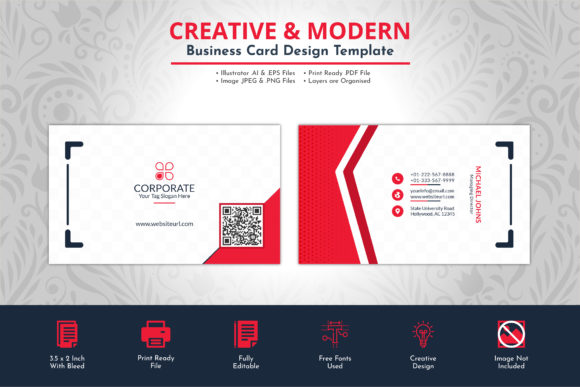
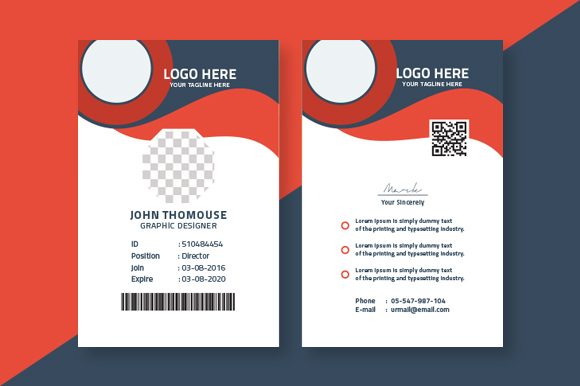
The Stylish Red Office ID Card is a professionally crafted design file ideal for printing employee badges, visitor passes, or membership cards. It comes with a clean layout, vibrant red color scheme, and all the main elements editable—names, titles, photos, logos, and more. The template is print-ready, meaning it meets industry standards for resolution (300 DPI), uses the correct CMYK color mode for accurate printing, and includes bleed settings for flawless output.
Built using vector-based EPS format, this ID card template ensures scalability without quality loss. Additionally, it features free fonts like Titillium, which are both modern and legible. A helpful information file is also included, guiding users through the customization process and ensuring they get the best results possible.
Common Mistakes When Using the Stylish Red Office ID Card Template
Many users overlook key details when downloading or customizing templates, leading to suboptimal outcomes. Here are some common mistakes and how to avoid them:
- Ignoring Bleed Settings: One frequent oversight is not adjusting the design to account for the 0.125-inch bleed. This can result in white borders appearing on the final printed product if not properly managed.
- Misusing Color Modes: The template is set in CMYK for print accuracy, but some may mistakenly change it to RGB before sending it to the printer, causing unexpected color shifts.
- Using Low-Resolution Images: Since the template is built for 300 DPI, using low-quality images can lead to pixelation and a lackluster finish. Always ensure your visuals match the required resolution.
- Overlooking Font Compatibility: While the template uses a free font like Titillium, not all systems have it installed. Failing to embed or replace the font can cause text to appear distorted or missing when opened on another device.
How These Mistakes Can Impact Your Results
Small errors during the design or printing process can significantly affect the outcome of your ID cards. For example, incorrect bleed settings might make your badge look unprofessional at the edges, undermining its purpose as a symbol of credibility. Similarly, poor image resolution can detract from the visual appeal of your office environment, especially if the card is used publicly or displayed prominently.
Color inaccuracies due to improper CMYK settings can also be misleading, particularly if your brand relies on specific shades. If your logo turns out duller than expected, it could confuse clients or employees. And if the text looks different across devices because of missing fonts, it may reflect poorly on your attention to detail.
Practical Tips to Avoid Errors and Maximize Quality
To get the most out of the Stylish Red Office ID Card template, follow these best practices:
- Check Bleed and Trim Margins: Before finalizing your design, confirm that all content extends beyond the trim line by at least 0.125 inches. This prevents any unwanted cut-offs during printing.
- Stick to CMYK Mode: Make sure your editing software is set to CMYK color mode and avoid converting it back to RGB unless absolutely necessary. This ensures colors remain consistent in print.
- Use High-Resolution Photos: Aim for images with a minimum of 300 DPI. Avoid stretching low-res pictures to fit the design, as it will compromise clarity.
- Embed or Replace Fonts: If you're working in a program that allows font embedding (like Adobe Illustrator), do so. Otherwise, replace the Titillium font with a similar one to maintain the intended aesthetic.
- Proofread Carefully: Typos in names, titles, or company info can lead to embarrassment and confusion. Double-check every element before exporting or sending the file for printing.
Real-Life Example: A Small Business Owner’s Experience
Jane, a local café owner, wanted to create custom ID cards for her baristas. She downloaded the Stylish Red Office ID Card template but forgot to adjust the bleed margins. After printing, she noticed thin white lines around the edges of the cards. Disappointed, she had to reorder and double-check the bleed settings this time. With the corrected design, the final cards looked sharp and added a touch of professionalism to her team’s uniforms.
What to Check Before Finalizing Your Design
Before you hit the "print" button or share your customized ID card, take a moment to verify the following:
- Is the design aligned with your brand's visual identity? Does the red theme complement your logo or color scheme?
- Are all placeholders updated with relevant information? Names, roles, and dates should be current and accurate.
- Have you followed the recommended layout guidelines provided in the included help file? Ignoring these instructions can lead to misprints or wasted materials.
- Does the file format (EPS) suit your printer’s requirements? Some printers may prefer PDFs; consider converting the file after making edits.
- Have you tested the design by printing a sample or previewing it on screen at actual size? This helps catch scaling issues early.
Comparing the Stylish Red Office ID Card to Other Options
When choosing an ID card template, it's important to compare options based on your needs. The Stylish Red Office ID Card excels in several areas:
- Customization Flexibility: Unlike many generic templates, this one allows full access to core design elements, enabling tailored branding.
- Print-Ready Format: It eliminates the guesswork associated with preparing files for commercial printing.
- Affordability and Simplicity: Being a downloadable resource, it avoids unnecessary costs such as hiring a designer for simple projects.
- Support and Guidance: The help file included ensures even beginners can navigate the template with confidence.
However, it’s worth noting that the template does not include placeholder images. If you don’t already have photographs or logos ready, you’ll need to source or prepare those separately. This isn't a flaw per se, but it's something to plan ahead for.
Why the Red Theme Works Well for Office Environments
Red is often associated with energy, passion, and authority—all qualities that align well with leadership and corporate branding. In office settings, the stylish red ID card can serve as a subtle yet powerful identifier. It conveys professionalism while standing out against typical blue or black ID cards, making it easier for visitors and employees to distinguish roles at a glance.
Additionally, red has strong visibility under various lighting conditions, which is especially useful in large or brightly lit offices where ID cards need to be easily spotted. As long as the design is balanced with neutral text and background elements, the red theme remains sophisticated rather than overwhelming.
Best Practices for Applying the Template
Here are a few tips to enhance your experience when applying the Stylish Red Office ID Card Template:
- Layer Management: Use layers in your design software to keep track of editable elements. This makes future updates much simpler.
- Consistency Across Cards: If designing multiple badges, maintain uniformity in layout, font styles, and image placement to preserve a cohesive appearance.
- Consider Accessibility: Ensure that text contrasts sufficiently with the red background. Black or dark gray fonts usually provide the best readability.
- Export Properly: After editing, export the file in a format compatible with your printer—common choices include PDF or PNG for digital sharing.
Pro Tip: Save Multiple Versions
Keep a version of the template untouched for future use. That way, you always have a clean base to start from if you need to update or reuse the design. Also, save your customized versions in both EPS and PDF formats for versatility in editing and printing.
Conclusion
The Stylish Red Office ID Card Template is a versatile and high-quality solution for businesses and individuals seeking a polished, customizable credential design. By understanding its features and avoiding common mistakes, you can produce ID cards that not only look great but also serve their functional purpose effectively. Always verify your settings, use appropriate resources, and follow the guidance provided in the template’s documentation to ensure success.
With careful planning and execution, your office ID cards can become a subtle yet powerful part of your brand identity. Don’t let minor oversights prevent you from achieving a professional look—make the most of what this template has to offer.