You Got This Graphic: A Versatile Tool for Creative Projects
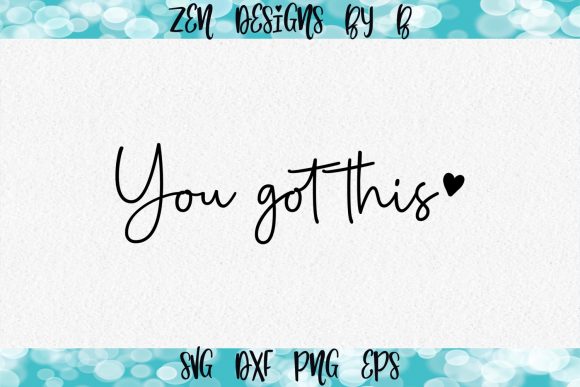
Whether you're a seasoned designer or just starting to explore the world of digital crafting, having the right graphic can make all the difference. The You Got This Graphic, available from ∞Hello From Zen Designs By B, is one such resource that has gained popularity among crafters and creators alike. Designed with both flexibility and inspiration in mind, this graphic set offers users a powerful way to add motivational flair to their projects without compromising on quality or compatibility.
What You Get with the You Got This Graphic
The You Got This Graphic comes in multiple file formats, ensuring it fits seamlessly into your creative workflow. Specifically, it includes:
- SVG (Scalable Vector Graphics) – Ideal for cutting machines like Cricut and Silhouette Studio.
- PNG (Portable Network Graphics) – Great for print projects, web use, and overlays.
- EPS (Encapsulated PostScript) – Perfect for professional printing and scalable editing in design software.
- DXF (Drawing Exchange Format) – Compatible with laser cutters and advanced design tools.
These formats allow you to adapt the graphic to almost any project, whether it's a custom mug, wall art, T-shirt design, or signage. It’s important to note, however, that the font used in the design is not included, so if you want to recreate or edit the text style yourself, you may need to purchase or locate the matching font separately.
Why File Formats Matter
When working with design software, knowing which file types are compatible can save time and frustration. For example, SVG files are vector-based, meaning they scale perfectly without losing quality—essential when designing for items like apparel or large banners. PNG files, on the other hand, are raster images but often come with transparent backgrounds, making them ideal for layering or digital displays.
EPS files are widely used in professional printing due to their high resolution and scalability. DXF files are especially useful if you work with laser cutters or CNC machines. The inclusion of these various file types means the You Got This Graphic is suitable for both hobbyists and professionals across different platforms.
Software Compatibility: Work with What You Know
One of the biggest advantages of the You Got This Graphic is its broad compatibility with popular design and cutting software. Here are some of the platforms it works well with:
- Cricut Design Space
- Silhouette Studio
- Make The Cut
- Sure Cuts a Lot
- Adobe Illustrator
- Adobe Photoshop
- Picmonkey
This versatility ensures that no matter what tools you prefer, you can bring your creative vision to life. If you're using an online platform like Picmonkey, the PNG format will be particularly helpful. Meanwhile, designers who rely on Adobe Illustrator or Inkscape will appreciate the EPS and SVG versions for their editable paths and clean lines.
Before You Buy: Check Your Software Requirements
While the You Got This Graphic is compatible with many programs, it’s always a good idea to confirm what file types your preferred software supports before purchasing. Some apps might require specific extensions or have limitations on how they handle layered graphics. Taking a quick look at your software’s documentation or support pages can help ensure smooth integration once you start working with the design.
Practical Uses for the You Got This Graphic
The beauty of the You Got This Graphic lies in its simplicity and universal appeal. The phrase “You got this” is uplifting and encouraging, making it perfect for a variety of uses. Here are just a few ideas where this graphic could shine:
- Motivational Wall Art: Create inspiring bedroom or office decorations with this graphic as a central message.
- Custom Apparel: Add the graphic to T-shirts, hoodies, or tote bags for a personalized touch.
- Digital Greeting Cards: Use the PNG version to design e-cards or printable cards for friends and family.
- Home Décor Projects: Incorporate the design into signs, mugs, keychains, or even wooden plaques.
- Business Branding: Use the graphic for social media posts, website headers, or promotional materials to uplift your brand image.
Thanks to its clean layout and bold message, the graphic is adaptable enough to fit into minimalist designs while still making a strong visual impact. Whether you’re creating something personal or professional, the You Got This Graphic serves as a great base for customization.
Customization Tips and Tricks
To get the most out of the You Got This Graphic, consider experimenting with colors, fonts, and layouts. Since the font isn’t included, you can try pairing it with complementary typefaces to match your project’s aesthetic. Also, don’t hesitate to resize the graphic—it was designed to maintain clarity at different scales thanks to its vector foundation.
If you're using a cutting machine like Cricut or Silhouette, you can easily modify the shapes or layers to create unique variations. For instance, you might turn the background into a solid color, outline the letters differently, or combine the graphic with other elements for a more complex design.
Inspiring Creativity Across Industries
The You Got This Graphic isn't just for personal use. Its positive message makes it a valuable asset in industries like education, fitness, wellness, and mental health. Teachers might use it to create classroom posters that encourage students during tough assignments. Fitness trainers could incorporate it into workout gear or motivational flyers. Wellness coaches may find it useful for branding materials or social media content aimed at uplifting their audience.
Even businesses outside of the creative field can benefit from this graphic. Retail stores selling self-care products, yoga studios, or personal development workshops can feature the graphic on signage, packaging, or promotional materials. Its universal nature allows it to resonate with a wide range of audiences, making it a smart choice for those looking to spread positivity through design.
How It Fits Into Modern Creative Workflows
Modern creators often juggle multiple tools and platforms, and the You Got This Graphic is built to keep up. With support for both desktop and cloud-based applications, it’s easy to move between devices and collaborate with others. The SVG and EPS formats are especially beneficial for those who want to tweak the design further, adjust dimensions, or integrate it into larger compositions.
Additionally, the graphic’s compatibility with tools like Adobe Illustrator and Photoshop opens the door to advanced features such as layer adjustments, gradients, and effects. These capabilities let you take a simple graphic and elevate it into something truly unique, tailored to your specific needs or brand identity.
Real-World Examples and Ideas
Let’s explore some real-world examples of how the You Got This Graphic can be used:
- Wall Stickers for Home Offices: Print the graphic on vinyl and apply it to your desk or walls for daily motivation.
- Gifts for Friends: Personalize mugs, journals, or canvas prints with the graphic and a heartfelt message.
- Workshop Promos: Use it in social media ads or email campaigns to promote a new class or event.
- Yoga Class Signage: Display the graphic in a studio to reinforce the calming and empowering atmosphere.
- Apparel for Runners: Embroider or print the graphic onto running shirts to boost morale during training sessions.
Each of these examples demonstrates the graphic’s adaptability. Because it’s neutral in tone yet powerful in message, it can be integrated into a wide array of themes and styles without clashing.
Designing for Different Audiences
Understanding your audience is key to effective design. The You Got This Graphic appeals to people seeking encouragement, affirmation, or a reminder of their strength. That said, it’s also subtle enough to work in more sophisticated contexts, like luxury wellness brands or boutique fitness studios.
For instance, a minimalist lifestyle blog might pair the graphic with soft pastel tones and negative space to emphasize calm confidence. On the flip side, a high-energy sports apparel brand could use bold colors and dynamic layouts to highlight determination and drive. Either way, the graphic remains a core element that enhances the overall message.
Things to Consider Before Choosing the Graphic
While the You Got This Graphic is highly versatile, there are a few factors to keep in mind before deciding to use it:
- Font Availability: As mentioned earlier, the font used in the original design isn’t included. If you plan to replicate or alter the typography, you’ll need to source the font separately.
- File Format Needs: Make sure you understand which file formats your tools accept. While SVG and PNG are widely supported, EPS and DXF might be less familiar to beginners.
- Project Scale: Think about the size of your final product. The graphic is designed to be clear and readable at various sizes, but you should test it on your chosen medium before committing to a large-scale print run.
- Color Customization: If your project requires specific color schemes, check if your software allows you to recolor the graphic effectively. Most modern design tools do, especially when working with vector files.
Taking these considerations into account will help you avoid potential issues and ensure your finished product looks exactly as intended.
Getting Started with the Graphic
If you're new to using SVG or EPS files, here’s a quick guide to help you begin:
- Download the You Got This Graphic in your preferred format.
- Open the file in your design software (e.g., Cricut Design Space, Silhouette Studio, or Adobe Illustrator).
- Edit the colors, layout, or text as needed.
- Export the final design in a format suitable for your output method—whether it's cutting, printing, or digital sharing.
- Enjoy your creation!
With these steps, even beginners can quickly learn how to manipulate and utilize the graphic for their own purposes. Online tutorials and community forums can offer additional guidance if you need help with specific software features.
Final Thoughts on Crafting with Positivity
At its core, the You Got This Graphic is more than just a design—it’s a message of empowerment and resilience. Whether you’re creating something for yourself or someone else, infusing your work with positive energy can enhance both the visual and emotional impact. And with the right tools and understanding of file formats, you can bring that message to life in countless ways.
As you dive into your next project, remember that creativity thrives when you have access to the right resources. The You Got This Graphic is a testament to how a simple design can inspire big results. So go ahead, download it, customize it, and let it fuel your crafting journey.
Happy Crafting 📌✂️