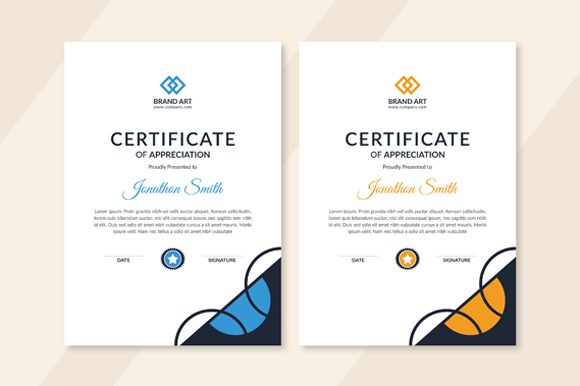
Award Certificate Template Layout for Professional Recognition
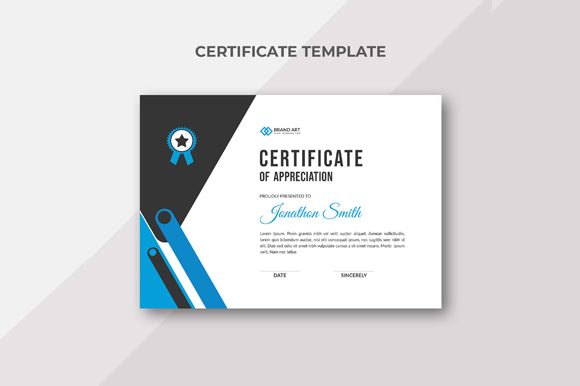
Creating a compelling award certificate doesn't have to be a time-consuming or technically challenging task. The Award Certificate Template Layout from This is Certificate offers a streamlined, high-quality solution that helps you produce polished and professional certificates with ease. Whether you're an educator presenting student achievements, a business owner recognizing team milestones, or a community organizer honoring volunteers, this template provides the tools needed to make your recognition efforts stand out.
Why Quality Matters in Award Certificates
Certificates serve as tangible symbols of achievement, appreciation, and excellence. They are often displayed publicly—on walls, social media, or resumes—and their design can reflect the credibility and professionalism of the issuer. A poorly designed certificate may not only fail to convey the intended honor but could also undermine the recipient's confidence in the awarding body.
The Award Certificate Template Layout ensures that your certificates look sharp and feel official. With its print-ready specifications and attention to detail, it allows you to maintain a consistent visual identity across all your recognition materials while saving time and effort in the process.
Key Features That Make It Stand Out
- Editable and Customizable Elements: Every main component of the layout—including text, graphics, and background elements—is fully editable. This means you can tailor the certificate to suit any occasion, whether it's a personal thank-you note or a formal industry award.
- Free Fonts Included: The template uses the Lato and Great Vibes fonts, both of which are free and widely respected for their elegance and readability. These fonts help your certificates maintain a premium appearance without requiring additional purchases.
- Print-Ready Specifications: Designed with professional printing in mind, the layout includes bleed settings of 6 mm and is formatted in CMYK color mode. These features ensure that your final product looks clean and vibrant when printed on physical media.
- Eps File Format: The template is delivered in EPS format, which is ideal for scalable vector graphics. This makes it perfect for use in both digital and print formats without losing quality.
- High Resolution (300 DPI): Whether you’re preparing certificates for a local event or sending them to a commercial printer, the 300 DPI resolution guarantees crisp, clear results every time.
- Help Information File: Each download includes a helpful guide that explains how to edit and customize the template effectively. This support file is especially useful for those who may not be familiar with design software.
Who Can Benefit Most From This Template?
This template is particularly valuable for professionals and organizations that frequently issue awards or recognitions. Educators can use it to create graduation certificates or commendations for students. Business owners and HR managers can streamline employee recognition programs. Event coordinators, bloggers, and influencers might use it for milestone celebrations or fan appreciation events.
Even hobbyists or small publishers who need to generate custom certificates for workshops, contests, or creative projects will find this layout incredibly useful. Its flexibility supports a wide range of needs, and its clean design adapts well to different themes and purposes.
Real-World Applications and Use Cases
Imagine organizing a local art contest and needing to hand out certificates to winners and participants alike. Using the Award Certificate Template Layout, you can quickly personalize each certificate with names, titles, and dates, maintaining a cohesive look throughout. You don’t need advanced graphic design skills—just basic editing tools like Adobe Illustrator or Photoshop.
Another scenario involves a school teacher wanting to acknowledge students' academic progress or special achievements. Instead of relying on generic, store-bought certificates, they can use this template to create something unique and meaningful. The ability to adjust colors, fonts, and layout details gives educators the freedom to align the certificates with their classroom branding or the nature of the award itself.
Freelancers and entrepreneurs might also use these certificates to present project completions or client milestones. A well-designed certificate adds a layer of professionalism to such gestures, reinforcing trust and strengthening relationships with clients or collaborators.
How This Template Supports Creativity and Efficiency
One of the standout aspects of the Award Certificate Template Layout is its balance between creativity and efficiency. While many templates either sacrifice design for simplicity or overwhelm users with complexity, this one strikes a smart middle ground. You can easily modify elements like borders, icons, and background textures to match your brand or event theme, yet the core structure remains intact and easy to navigate.
This level of customization is especially beneficial when you need multiple versions of a certificate. For instance, if you're running a series of online courses and want to issue completion certificates, you can tweak the wording and imagery for each course without starting from scratch each time. The result is a collection of visually consistent yet distinct certificates that enhance your program’s perceived value.
Moreover, the inclusion of a help information file reduces the learning curve associated with using design software. Even if you're new to working with EPS files or adjusting CMYK color profiles, the guidance provided in the documentation ensures you can achieve professional results without frustration.
Time-Saving Design Without Compromise
Designing a certificate from scratch requires significant time and resources. You'd need to consider typography, spacing, color psychology, and technical print requirements. With the Award Certificate Template Layout, much of this groundwork is already done. The template adheres to best practices in design and functionality, so you can focus more on the content and less on the mechanics.
For example, a nonprofit organization planning a volunteer appreciation ceremony can prepare dozens of certificates in just a few hours instead of days. By leveraging the template’s pre-built framework, they can maintain consistency in font sizes, alignment, and overall aesthetics across all certificates, ensuring a professional finish without the need for a designer.
Ensuring Compatibility and Flexibility
Because the template is available in EPS format, it works seamlessly with most professional design applications. If you prefer to work in Adobe Illustrator, InDesign, or Photoshop, you’ll find the file compatible and easy to adapt. Additionally, the use of standard fonts like Lato and Great Vibes ensures that there are no licensing issues or font-missing errors when sharing or printing the designs.
The CMYK color setting is another important feature. Unlike RGB colors used for digital screens, CMYK is optimized for printing. This means your certificates will appear accurately in color when professionally printed, avoiding unexpected shifts in tone or shade that can occur with unoptimized files.
With a 300 DPI resolution, the template also ensures that your certificates are sharp and legible even when printed at larger sizes. This is essential for physical awards that will be framed or hung in public spaces where clarity is key.
When to Consider Alternatives
While the Award Certificate Template Layout is highly versatile, it’s worth noting that it is a single-design template. If your project requires a variety of styles or you're looking for a dynamic, multi-use certificate generator, you may want to explore other options that offer more variations or interactive features.
Additionally, if you’re not comfortable with design software, you might benefit from a tool that includes a user-friendly drag-and-drop interface. However, the help file included with this template does provide a solid foundation for beginners, making it accessible to a broad audience.
Best Practices for Using the Template
To get the most out of the Award Certificate Template Layout, start by clearly defining the purpose of your certificate. Is it for a competition? An employee award? A personal token of gratitude? Understanding the context will help you decide which elements to highlight and how to customize the design accordingly.
- Review the Help File: Before diving into edits, take a moment to read through the included help information. It can clarify how to access layers, change colors, and manage text fields efficiently.
- Use High-Quality Images: If your certificate includes a logo or photograph, ensure it's high-resolution to match the 300 DPI standard of the template. Low-quality images can detract from the overall professionalism of the certificate.
- Test Print Before Finalizing: Always do a test print to verify color accuracy, alignment, and overall presentation. The 6 mm bleed setting is crucial for commercial printers, but a quick check before mass production can prevent costly mistakes.
- Consider Accessibility: When choosing colors and fonts, think about contrast and legibility for individuals with visual impairments. While the default settings are visually appealing, some customization may be necessary to meet accessibility standards.
Examples of Effective Customization
Here are a few practical examples of how the template can be adapted for specific situations:
- Corporate Awards: Change the background to a company color scheme, add the organization’s logo, and include a personalized message from the CEO.
- Academic Achievements: Replace the default icon with a graduation cap or book, and adjust the font style to reflect formality and tradition.
- Community Events: Incorporate local imagery or landmarks into the design to give the certificate a unique, place-based identity.
- Personal Milestones: Add a handwritten-style signature field and a decorative border to create a warm, individualized touch.
Conclusion: A Reliable Tool for Meaningful Recognition
The Award Certificate Template Layout from This is Certificate is more than just a design—it's a practical resource for anyone who wants to recognize achievement with style and substance. Its combination of professional-grade specifications and user-friendly customization makes it a go-to option for creators, educators, and business professionals alike.
By using this template, you can elevate your recognition efforts, save valuable time, and maintain a consistent visual identity across all your certificates. Whether you're issuing a simple thank-you note or a prestigious award, the right design can make all the difference in how it’s received and remembered.
Ultimately, the Award Certificate Template Layout empowers you to create certificates that truly reflect the significance of the moment. With thoughtful customization and reliable print-ready features, it becomes a powerful tool for celebrating success in both digital and physical formats.