Creative ID Card Template for Professional and Personal Use
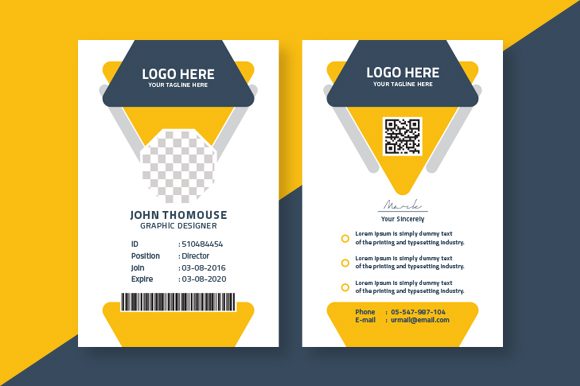
Designing an ID card that stands out is more than just a technical task—it's about creating a visual identity that reflects your brand, personality, or organization. With the Creative ID Card Template, you get a powerful design foundation built to meet both aesthetic and functional needs. Whether you're preparing staff badges, event passes, membership cards, or personal identification, this template offers a sleek, customizable solution that balances creativity with practicality.
What Makes This Creative ID Card Template Unique?
The Creative ID Card Template is crafted with modern designers in mind. It features a clean layout, smart bleed settings (0.125 inch), and a CMYK color profile optimized for print. The 300 DPI resolution ensures sharp, professional results every time, while the inclusion of an EPS file format allows for full scalability without quality loss. What truly sets it apart is its flexibility—every main element is editable and customizable, from text fields to background colors and shapes.
This template isn’t just about looks; it’s designed for real-world application. Its structured yet creative approach makes it ideal for businesses needing consistent branding across multiple ID formats, as well as individuals who want to create custom credentials for events, workshops, or even personal use. The font used, Titillium, is a premium sans serif typeface known for its clarity, elegance, and adaptability across both digital and print media.
Why Titillium Works So Well in This Template
Titillium is a modern typography choice that brings a sense of professionalism and contemporary flair to any design. As a sans serif font, it lacks the small finishing strokes (serifs) at the end of characters, making it highly legible on screens and in printed materials alike. This characteristic is especially important for ID cards, where readability is key for quick recognition and information processing.
Titillium’s open letterforms and balanced proportions help maintain visual hierarchy, ensuring names, titles, and other details are easy to read at a glance. Because it’s a free font, it's accessible for all users without compromising the premium look of your final product. Its versatility also means it pairs well with a range of other fonts—whether you're using a bold script for signatures or a subtle serif for body copy, you can test different combinations to find what works best for your project.
When to Use This Font in Your Design Projects
- Logo Design: Titillium can be used to craft logos that feel fresh and modern. Its geometric structure lends itself well to minimalist designs.
- Editorial Design: For magazines, newsletters, or brochures that include ID-style inserts, this font helps maintain a cohesive and professional appearance.
- Packaging Design: If your brand uses ID cards as part of promotional packaging or branded merchandise, the font supports a unified brand identity.
- Web Design: Its crisp edges and high screen readability make it a solid choice for website headers or user interface elements inspired by physical ID cards.
- Social Media Graphics: When sharing digital versions of your ID cards online, Titillium keeps the visual appeal intact across platforms.
How to Choose the Right Font Pairings
While the Creative ID Card Template comes with a strong default font, experimenting with pairings can elevate your design further. A popular strategy is to combine Titillium with a complementary script or handwritten font for names or taglines. Just ensure there's enough contrast between the two styles so they don't clash visually.
For example, pairing Titillium with a soft script font like Quicksand or Raleway can add a touch of warmth and personality without sacrificing legibility. On the flip side, if you're aiming for a more corporate look, stick to another sans serif such as Montserrat or Roboto to maintain a streamlined, professional tone.
Here’s a quick guide to effective font pairing:
- Match the tone: Keep the same mood (modern, elegant, playful) across fonts.
- Balance weight and style: Avoid combining two very heavy or two very light fonts unless intentional for emphasis.
- Use hierarchy: Let one font take the lead (like Titillium for titles) and let the secondary font support it (for body text or accents).
Real-World Applications and Design Tips
Many small business owners use this template to create employee ID cards that align with their brand identity. By customizing the color palette and adding company-specific graphics, they ensure that the ID cards not only serve a function but also reinforce brand recognition. Similarly, event planners often leverage the template for VIP passes or attendee badges, integrating event themes through imagery and layout adjustments.
One thing to consider when working with this template is how to handle image placement. Since images aren't included in the download, you’ll need to source or design them separately. High-resolution photos or vector-based icons work best to maintain the overall quality of the ID card. Make sure to follow standard photo sizing guidelines for official-looking credentials.
Also, keep an eye on the bleed setting. At 0.125 inch, it provides enough margin for trimming without cutting into critical design elements. Always double-check your printer's specifications before finalizing the layout to avoid unexpected cropping issues.
Professionalism and Brand Perception Through Typography
Choosing the right typeface can significantly impact how your audience perceives your brand. A poorly chosen font can send the wrong message—unreliable, outdated, or untrustworthy. In contrast, the Creative ID Card Template with Titillium conveys a sense of clarity and competence. These are essential qualities for anything that identifies people or represents a business.
Consider how a simple font change can transform the whole vibe of your ID cards. A bold display font might suit a tech startup, while a softer sans serif could work better for a wellness retreat. Either way, maintaining consistency in your brand identity is crucial. Using the same font family across all marketing materials—including your ID cards—helps build familiarity and trust with your audience.
Readability and Visual Hierarchy in Practice
When designing ID cards, visual hierarchy determines how quickly someone can read and understand the information. Titillium, being a sans serif font, naturally supports clear communication. But you can enhance this by adjusting font sizes, weights, and spacing within the template.
Try these tips to improve readability:
- Use bold weights for names and titles to draw attention immediately.
- Lighter weights work well for secondary information like addresses or dates.
- Ensure ample white space around text to prevent clutter and reduce cognitive load.
These adjustments help viewers process the most important data first—exactly what you want from an ID card. And since everything in the template is fully editable, you can tweak each element until it feels just right for your specific needs.
Getting Started with the Creative ID Card Template
Using the Creative ID Card Template is straightforward, even for those new to design software. The package includes a detailed information file that walks you through setup, customization, and export options. You'll find guidance on how to replace placeholders, adjust colors, and scale elements appropriately for print or digital use.
If you're unsure where to begin, start by defining the purpose of your ID card. Is it for internal use, public-facing events, or customer interaction? Once you have a clear goal, customize the template to reflect that intent. For instance, adding your logo or brand colors will instantly make the card feel more professional and aligned with your overall brand strategy.
Commercial Licensing and Practical Considerations
One of the biggest advantages of the Creative ID Card Template is that it's built with commercial projects in mind. Whether you’re printing hundreds of badges for a conference or creating personalized ID cards for a client, you can do so without worrying about licensing restrictions. That said, always confirm the usage rights of the fonts and assets you incorporate, even if they’re free—some may require attribution or have limitations on redistribution.
To stay compliant and organized, review the included documentation thoroughly. Understanding the legal boundaries of your design assets ensures peace of mind and avoids potential pitfalls down the line.
Final Thoughts on Creative Flexibility
In today’s fast-paced creative landscape, having access to adaptable design tools is essential. The Creative ID Card Template gives you exactly that—a robust, ready-to-use framework that supports your unique vision. From small startups to large corporations, hobbyists to freelance marketers, this template serves a wide array of users who value both form and function in their design output.
Its combination of high-quality resolution, CMYK readiness, and a clean, modern font makes it suitable for almost any context. Whether you're printing a single card or scaling up production, you can rely on this template to deliver consistent and professional results.
So next time you need an ID card that doesn’t just look good but works well too, give the Creative ID Card Template a try. It’s a versatile asset in your design toolkit—one that can help you communicate effectively and stylishly, no matter the project.