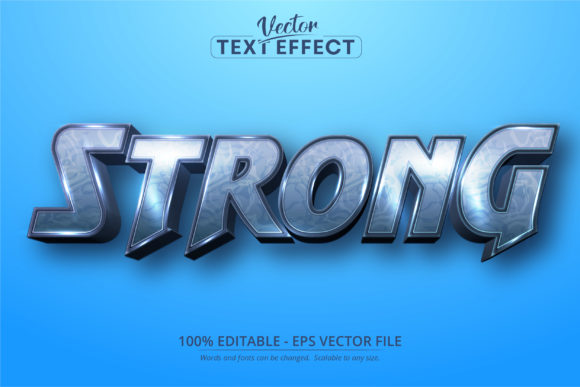
Strong Text, Cartoon Style Text Effect: Creative Design Tool
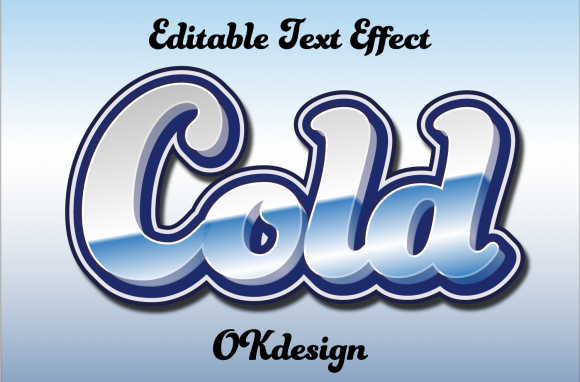
The Strong Text, Cartoon Style Text Effect is a powerful Adobe Illustrator tool that transforms ordinary text into eye-catching, cartoon-inspired visuals. This isn’t just another font—it’s an advanced effect that adds dimension, character, and fun to your typography, making it perfect for creative projects where visual impact matters. Designed specifically for Adobe Illustrator in the EPS CS6 format, this effect offers 100% editability and scalability, giving you full control over every detail of your design.
What Makes It Unique?
While many designers rely on bold fonts or hand-drawn lettering to add flair, the Strong Text, Cartoon Style Text Effect takes a different approach. It uses vector-based effects within Adobe Illustrator to simulate a cartoon-style look—complete with exaggerated strokes, playful shadows, and vibrant outlines. Unlike traditional fonts, which are static and limited in customization, this effect allows you to manipulate individual elements of each letter, from line thickness to color gradients, ensuring your text aligns perfectly with your project's tone and style.
Why Use a Font Effect Instead of a Regular Font?
- Highly customizable: You can tweak every part of the text, from stroke weight to shadow depth.
- Scalable without loss of quality: Because it's vector-based, the effect works at any size, from tiny labels to massive billboards.
- Exclusive to Adobe Illustrator: The file format ensures compatibility and performance only within Adobe's ecosystem.
- Professional-grade results: Achieve a polished, animated feel with minimal effort and maximum flexibility.
Unlocking Creativity: Applications and Ideas
Whether you're designing for print, digital media, or personal projects, the Strong Text, Cartoon Style Text Effect opens up a world of possibilities. Let’s explore how different users can apply it creatively:
For Designers and Illustrators
This effect is ideal for creating logos, posters, and branding materials that stand out with a whimsical yet strong aesthetic. Think about using it in children's book illustrations, comic strips, or promotional art for entertainment events. For example, when designing a logo for a local toy store, applying this effect can give the brand a youthful, energetic vibe while maintaining professionalism through clean lines and structure.
For Marketers and Entrepreneurs
If you're running a campaign targeting younger demographics or launching a product with a playful angle, this text effect can help you create engaging social media graphics, email headers, or website banners. Its versatility means you can use it across multiple platforms—from Instagram posts to YouTube thumbnails—while keeping a consistent visual identity. Imagine using it in a promotional video for a new animated movie; the effect could match the title card seamlessly with the film’s style.
For Bloggers and Publishers
Bloggers looking to add personality to their headlines or section titles can benefit from this effect. Whether it's a lifestyle blog, tech review site, or educational platform, the right amount of cartoon stylization can make content more inviting and easier to scan. For instance, a food blog might use the effect in a recipe header to evoke a sense of fun and creativity, especially when highlighting kid-friendly meals or themed cooking sessions.
For Educators and Hobbyists
Teachers and hobbyists can use the Strong Text, Cartoon Style Text Effect to make learning materials more engaging. From classroom posters to DIY greeting cards, the effect adds charm and clarity. A science teacher might create a poster explaining the solar system, using the effect to highlight key terms like “Mars” or “Jupiter” in a way that appeals to young learners. Similarly, a craft enthusiast can design custom t-shirts or mugs with personalized messages that pop visually.
Practical Tips for Using the Effect
To get the most out of the Strong Text, Cartoon Style Text Effect, consider these tips that ensure your designs remain clear and effective:
- Start with readable type: Even though the effect adds cartoon-like features, the base text should still be legible. Avoid overly complex or decorative fonts before applying the effect.
- Experiment with layer styles: Play around with blending modes, drop shadows, and gradient fills to enhance the cartoon effect without overwhelming the viewer.
- Match the tone of your project: The strength and playfulness of the effect should align with your message. A softer version might work better for a children's storybook than for a superhero-themed poster.
- Use sparingly for emphasis: Apply the effect to key phrases or headlines rather than entire blocks of text. This helps maintain readability and keeps the focus on what matters most.
Real-World Project Ideas
Here are some practical ways to bring the Strong Text, Cartoon Style Text Effect into your workflow:
- Animated Book Covers: Create covers that blend realism and fantasy, especially for fiction or graphic novels.
- Festival Posters: Add energy and excitement to event promotions with dynamic, colorful text treatments.
- Educational Infographics: Highlight important data points or keywords in a visually appealing way that draws attention.
- YouTube Thumbnails: Make your videos stand out by using the effect for titles or subtitles in a lighthearted or humorous context.
- Merchandise Designs: T-shirts, stickers, and phone cases often benefit from bold, expressive typography that grabs attention.
Customization Options: Making It Your Own
One of the biggest advantages of the Strong Text, Cartoon Style Text Effect is its editability. Since it's built as an EPS file in Adobe Illustrator, you can adjust colors, shapes, and even the underlying path of the text itself. Here’s how you can personalize it:
- Change Colors: Replace default hues with brand-specific palettes or seasonal themes.
- Adjust Stroke Weights: Thicker strokes can convey boldness, while thinner ones suggest delicacy or whimsy.
- Modify Outlines: Expand or contract the outline of the letters to suit your layout or composition needs.
- Add Gradients: Use subtle shading to give the text a three-dimensional cartoon look.
- Combine with Other Effects: Layer the effect with textures, patterns, or additional vector graphics for a more unique result.
Audience-Friendly Design Considerations
When using the Strong Text, Cartoon Style Text Effect, always keep your audience in mind. While it’s tempting to go all-out with stylistic flourishes, balance is key. For professional settings, opt for a cleaner application of the effect to maintain credibility. In casual or entertainment contexts, you can let the effect shine brighter and bolder.
Also, consider contrast. If your background is busy or colorful, choose text colors and effects that ensure readability. Test your design in black-and-white or grayscale to confirm it remains effective under various viewing conditions.
Getting Started with Strong Text, Cartoon Style Text Effect
If you’re new to working with Adobe Illustrator text effects, here’s a quick guide to help you begin:
- Open Adobe Illustrator: Import the EPS file into your document. Make sure you're using CS6 or a compatible version.
- Edit the Text: Double-click the text to modify it directly. Change the wording, font, or alignment as needed.
- Adjust the Effect: Use the Appearance panel to fine-tune the cartoon styling. Experiment with opacity, blur, and offset settings to find the perfect look.
- Export for Use: Once satisfied, export your design in the desired format (PNG, JPEG, SVG) depending on whether it will appear online or in print.
Recommended Tools and Practices
Working with vector effects in Adobe Illustrator requires a few tools and techniques to maximize efficiency:
- Appearance Panel: Essential for managing layers and effects applied to your text.
- Layer Management: Keep your design organized by separating text and background elements into different layers.
- Smart Objects: Convert your text to a smart object if you plan to reuse the same effect across multiple designs.
- Non-Destructive Editing: Always work with editable effects so you can tweak them later without starting from scratch.
Adapting the Effect for Different Platforms
Because the Strong Text, Cartoon Style Text Effect is scalable and vector-based, it adapts well to various formats and sizes. However, the way you present it may vary depending on the platform:
Print Projects
For print, ensure your colors are CMYK-compatible and that your design has proper bleed and margins. The effect’s crisp lines and high-quality vectors make it suitable for everything from brochures to large-format signage.
Digital Media
On websites or apps, optimize the exported images for web use. Reduce file size while maintaining clarity. When used in UI/UX design, consider how the effect interacts with buttons, menus, and icons—keeping it functional and accessible.
Social Media
On platforms like Facebook, Instagram, or Twitter, leverage the effect to make your captions or headlines pop. But remember that mobile screens often compress images, so avoid overly intricate details that might get lost in smaller views.
Staying Original and Consistent
With such a flexible effect, it's easy to create something unique—but originality comes from thoughtful application. To stay consistent in your branding or theme, develop a set of rules for how and when you use the effect. Maybe you reserve it for headings, or maybe you pair it with specific icon sets or color schemes.
Try creating variations of the effect for different purposes. A softer version might work for a blog post title, while a bolder iteration suits a festival poster. Keeping a library of saved styles can streamline your workflow and help maintain a cohesive look across projects.
Where to Find Inspiration
Look to popular cartoon series, animated films, and digital art communities for ideas on how to incorporate the Strong Text, Cartoon Style Text Effect into your own work. Websites like Behance and Dribbble feature countless examples of text-based designs that blend style and substance. Don’t hesitate to reverse-engineer what you see—many successful designs are combinations of simple effects and clever layouts.
Final Thoughts on Creative Typography
Typography is more than just choosing a font—it's about expressing a message in a way that resonates with your audience. The Strong Text, Cartoon Style Text Effect is a versatile tool that empowers creators to push boundaries while staying grounded in usability. Whether you're aiming for humor, nostalgia, or just a standout headline, this effect gives you the freedom to experiment and innovate.
As with any design element, the secret to success lies in understanding your purpose and your audience. Use the effect to enhance—not distract—and watch how your words come to life with a little bit of cartoon magic.