YouTube Thumbnail for Online Workshop: A Practical Design Tool for Content Creators
In the competitive landscape of online content creation, first impressions are everything. One of the most impactful elements in capturing a viewer’s attention is the YouTube thumbnail. For those running or promoting an online workshop, having a professional and visually compelling thumbnail can significantly influence click-through rates and audience engagement. The YouTube Thumbnail for Online Workshop template offers a streamlined solution tailored specifically to this niche, making it a valuable asset for educators, entrepreneurs, marketers, and creators who rely on video platforms to deliver their message.
What Is the YouTube Thumbnail for Online Workshop?
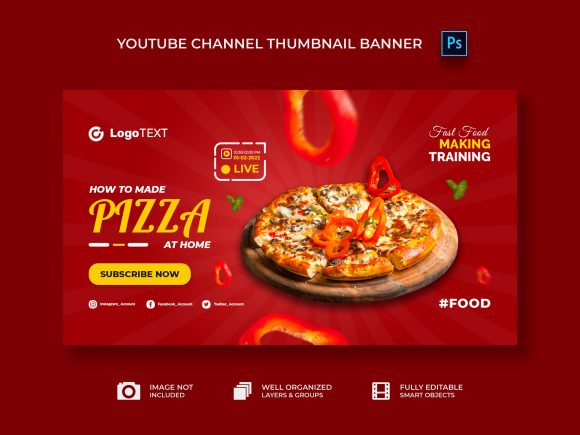
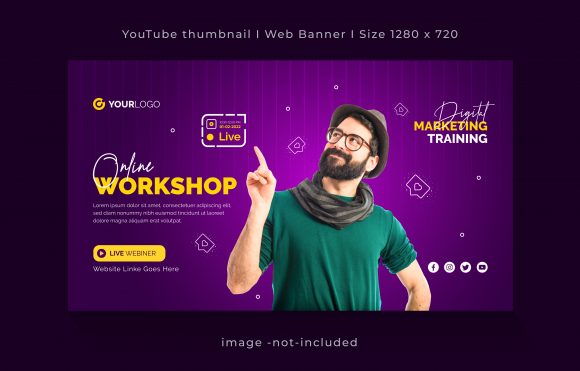
The YouTube Thumbnail for Online Workshop is a design-ready template created to help users craft effective thumbnails for videos that promote educational or skill-based content. Unlike generic templates, this one is optimized for clarity and relevance when showcasing workshops—whether they’re about digital marketing, personal development, software tutorials, or any other topic where visual appeal plays a key role in attracting participants.
This template is fully editable and comes in the industry-standard EPS format, ensuring high-quality scalability for various uses. Its RGB color profile and 300 DPI resolution make it suitable for both digital and print applications, though its primary use remains online visibility. The dimensions (1280×720 pixels) align perfectly with YouTube’s recommended thumbnail size, helping your content stand out without being cropped or distorted.
Key Features and Advantages
- Fully Editable Layers: The template is well-organized, allowing for easy customization. Each element—text, shapes, and placeholders—is separated into distinct layers, which makes editing intuitive even for those with basic design skills.
- High-Resolution Output: At 300 DPI, the file ensures sharp visuals across devices. This is especially important as many modern screens render images at higher resolutions, and a blurry thumbnail can deter clicks.
- RGB Color Profile: Designed for digital display, the RGB color settings ensure vibrant and accurate colors when uploaded to YouTube or used elsewhere online.
- Font Accessibility: All fonts used in the template are free and easily downloadable, so you don’t face licensing issues when customizing or sharing your design.
- No Image Included: While the template provides a layout and style guide, it does not include actual stock images. This allows for greater flexibility in choosing visuals that best represent your brand or workshop content.
Real-World Performance and Use Cases
When evaluating the effectiveness of the YouTube Thumbnail for Online Workshop, it's helpful to consider how it performs in practical scenarios. For instance, if you're hosting a webinar on social media strategy, using this template can help you create a thumbnail that clearly communicates the value of the session while maintaining a polished aesthetic.
Creators often underestimate the power of a consistent visual identity. With this template, you can maintain uniformity across multiple workshop-related videos by reusing the same design structure but swapping out text and imagery. This consistency helps build brand recognition and trust among viewers, encouraging them to return for more content.
Another benefit is the time saved in the design process. Instead of starting from scratch each time, professionals can leverage this pre-built framework to focus on what matters most—their content and messaging. This efficiency is particularly appealing to busy entrepreneurs and small business owners who need to produce regular video updates without dedicating excessive time to graphic design.
Who Can Benefit Most from This Template?
This template is ideal for a wide range of individuals and organizations, including:
- Educators and Coaches: Those who run virtual classes or training sessions will find it useful for promoting upcoming modules or course segments.
- Entrepreneurs and Startups: Businesses launching online product demos or customer education programs can use it to reinforce their branding.
- Freelancers and Consultants: Professionals offering specialized services via webinars or tutorials can enhance their credibility through a clean, professional thumbnail.
- Content Marketers: Brands creating instructional or promotional videos for workshops can maintain visual coherence across their campaigns.
- Bloggers and Publishers: When supplementing written content with video explanations or live Q&A sessions, this template supports cohesive storytelling.
For these users, the ability to quickly produce a high-quality thumbnail means less time spent on design and more time focused on delivering value through their workshop content.
Quality, Usability, and Flexibility
The quality of the YouTube Thumbnail for Online Workshop lies in its clean layout and thoughtful layer organization. It avoids overcomplication, which is a common pitfall in many design templates. The simplicity ensures that users can adapt it to different themes without compromising readability or visual appeal.
Usability is another strong point. Whether you're using Adobe Illustrator or another vector-based tool, the layered structure facilitates easy access to all elements. Users can modify text sizes, change background colors, adjust icon positions, and more—all within a familiar interface.
Flexibility is built into the core of this template. Since it doesn’t come with fixed images, you can integrate your own graphics, logos, or branded assets. This level of control is essential for businesses and creators who want their thumbnails to reflect their unique voice and style.
Limitations and Considerations
While the YouTube Thumbnail for Online Workshop offers a solid foundation, there are a few limitations to keep in mind. First, since it doesn’t include images, users must source or create their own. This may require additional effort or resources, especially if you’re not already working with a stock image library or photographer.
Second, although the template is highly customizable, it still requires some basic knowledge of design tools like Adobe Illustrator. Beginners might need to spend time learning how to manipulate layers, apply effects, or export files correctly. However, given the straightforward nature of the template, this learning curve is minimal and manageable.
Lastly, the effectiveness of the thumbnail also depends heavily on the content behind it. No matter how professionally designed the thumbnail is, it won’t drive long-term success unless the video itself delivers value. Always pair a strong visual with equally strong content.
Practical Recommendations for Use
- Choose High-Quality Images: Since the template is image-free, invest time in selecting or creating visuals that resonate with your target audience. Use tools like Unsplash, Pexels, or Canva to find royalty-free images that match your theme.
- Align Text with Video Content: Make sure the headline and supporting text on the thumbnail accurately reflect the video’s content. Misleading thumbnails can lead to lower retention rates and potential backlash from your audience.
- Test Variations: Create multiple versions of the thumbnail using different color schemes, fonts, or layouts. Test them using YouTube’s analytics to see which ones perform best in terms of views and engagement.
- Maintain Brand Consistency: If you have existing branding guidelines, apply them consistently across thumbnails. This builds familiarity and reinforces your workshop’s professionalism.
Long-Term Value and Reliability
Investing in a template like the YouTube Thumbnail for Online Workshop can offer long-term benefits, especially for creators who regularly upload content. The ability to reuse the template structure across multiple projects reduces design overhead and maintains a cohesive look, which is crucial for building a recognizable brand.
Over time, as your workshop grows and evolves, you’ll likely appreciate the flexibility to tweak the template rather than redesigning from the ground up. This adaptability makes it a reliable tool for sustaining a professional online presence without recurring costs associated with hiring designers for every new video.
Final Thoughts on the YouTube Thumbnail for Online Workshop
If you’re looking for a practical, scalable, and professional way to design thumbnails for your online workshop videos, the YouTube Thumbnail for Online Workshop is a smart choice. It combines functionality with aesthetic appeal, empowering users to create engaging visuals that support their educational or business goals.
However, it's important to approach it with realistic expectations. The template serves as a base—not a magic bullet. Success will depend on how well you leverage it to communicate your message and align it with your overall content strategy. With the right approach, though, it can become a cornerstone of your YouTube branding efforts.
Ultimately, whether you're a seasoned marketer or a first-time educator launching your online workshop series, this template is worth considering for its ease of use, quality output, and strategic fit with YouTube’s platform requirements. Just remember to complement it with strong content and thoughtful planning to maximize its impact.