Food YouTube Thumbnail Banner – A Practical Guide for Creators and Marketers
When it comes to growing a Food YouTube channel, one of the most overlooked yet powerful tools is the thumbnail. It's the first thing viewers see in their search results or recommendations, and it plays a huge role in whether they click on your video. A well-designed Food YouTube Thumbnail Banner can significantly boost your click-through rate (CTR), increase watch time, and help you stand out in a crowded content space.
What Is a Food YouTube Thumbnail Banner?
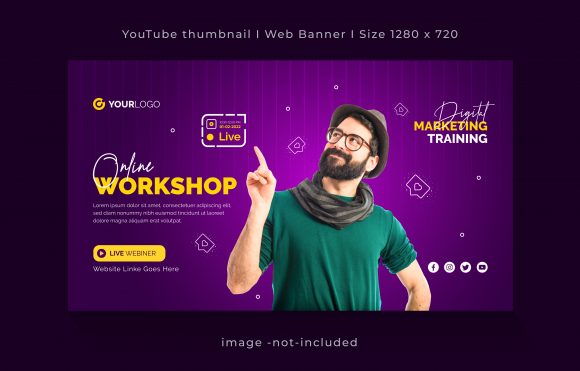
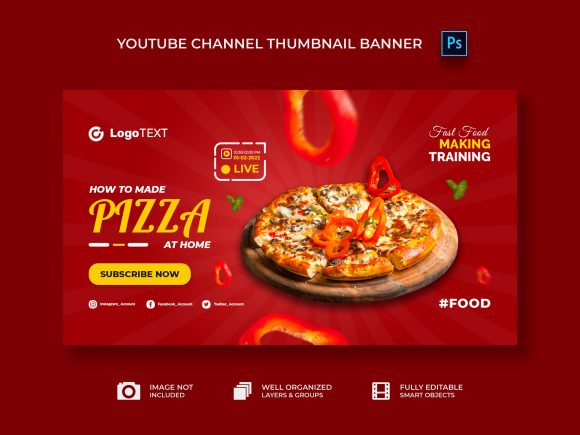
A Food YouTube Thumbnail Banner is a specially designed image that represents your video on the platform. Unlike a standard thumbnail, which might be pulled automatically from your video, a banner-style thumbnail gives you full creative control over what appears in the preview. These banners are typically used to showcase key ingredients, dishes, or cooking steps in an eye-catching way.
The most common size for a YouTube thumbnail is 1280x720 pixels, and when you use a fully editable template, especially in PSD format with smart objects, you gain the flexibility to customize every element without needing advanced design skills. This makes it ideal for both beginners and seasoned creators who want consistency across their content library.
Why You Need a Custom Food YouTube Thumbnail Banner
Think about how many food videos appear in your feed daily. From quick recipe hacks to elaborate dessert tutorials, the competition is fierce. Your thumbnail needs to catch attention within seconds. That’s where a custom Food YouTube thumbnail banner shines — it helps you communicate the essence of your video at a glance.
Using a professionally crafted template ensures your thumbnails look polished and cohesive. Whether you're running a personal blog, managing a restaurant’s social media, or promoting a new cookbook, having a consistent visual identity builds trust and recognition among your audience.
Real-World Use Cases for Food YouTube Thumbnail Banners
Let’s dive into some realistic scenarios where using a Food YouTube thumbnail banner can make a big difference:
- Cooking Channel Owners: If you run a cooking channel, your thumbnails should reflect the type of cuisine or dish featured in the video. For example, if you’re making a video about “Quick Healthy Lunch Ideas,” your banner could show colorful plates with vegetables, grains, and proteins arranged neatly. The goal is to highlight the meal while keeping the design clean and inviting.
- Restaurant Marketing Teams: Restaurants often create behind-the-scenes content to promote their brand. A Food YouTube thumbnail banner featuring their signature dish with the restaurant logo subtly placed in the corner can reinforce brand visibility and attract potential customers.
- Food Bloggers & Influencers: Many food bloggers repurpose their blog content into YouTube videos. A custom thumbnail banner allows them to maintain brand alignment across platforms. Imagine sharing a post titled “5 Best Spices for Indian Cooking” — the banner would visually support the content with spice jars and maybe a tagline like “Elevate Your Curry Game.”
- Recipe App Developers: If you're developing an app that features user-submitted recipes, using standardized Food YouTube thumbnail banners can help maintain a professional appearance across all shared content. Users will recognize the style instantly, creating a sense of community and quality.
- Online Cooking Classes: Educators who host virtual classes benefit from thumbnails that clearly indicate the lesson topic. A banner showing a step-by-step baking process, for instance, can entice learners who are looking for structured content.
How Different Users Benefit from Using a Food YouTube Thumbnail Banner
Depending on your role, a Food YouTube thumbnail banner can serve different purposes:
- Freelancers and Small Business Owners: With limited time and budget, freelancers and small businesses need templates that are easy to edit. A PSD smart object file means you can change colors, fonts, images, and text quickly. No need to hire a designer for each new video — just swap in your latest dish and go!
- Entrepreneurs Launching a Brand: Consistency is key when building a brand. Using the same thumbnail banner style across all your videos creates a recognizable pattern, helping your brand grow faster. Think of it as your digital storefront: it needs to look good and say exactly what people want to hear before they even open the video.
- Marketing Agencies: Agencies working with clients in the food industry can offer these templates as part of a branding package. They allow for rapid production of high-quality thumbnails that match the client's color scheme and messaging. This streamlines the content creation process and improves campaign performance.
- Hobbyists Sharing Their Passion: Even if you're not a professional, you want your content to look great. A customizable Food YouTube thumbnail banner lets you present your home-cooked meals in a way that feels professional and engaging. You’ll feel more confident sharing your content knowing it looks its best.
Features That Make a Difference
When choosing a Food YouTube thumbnail banner, the right features can save you time and effort. Here’s why certain elements matter:
- Size 1280×720 Pixels: This is the optimal resolution for YouTube thumbnails. Anything smaller may look blurry or pixelated, especially on larger screens. Sticking to this size ensures your thumbnail looks sharp and clear wherever it appears.
- RGB Color Mode: Since YouTube displays content digitally, RGB is the preferred color mode. It ensures accurate color representation on monitors and mobile devices, which is especially important when showcasing vibrant foods like ripe tomatoes, golden pastries, or fresh herbs.
- 300 Dpi Resolution: While online content doesn’t always require high DPI, this specification ensures the image remains crisp and detailed. It also makes it easier to print promotional materials if needed, such as flyers or posters featuring your popular videos.
- Well Organized Layers: One of the biggest frustrations for designers is dealing with messy layer structures. A well-organized PSD file with named layers and grouped elements makes editing straightforward. You won’t waste hours trying to figure out how to adjust the background or move a title box around.
- Smart Object Support: Smart objects allow you to scale images without losing quality. If you’re adding a photo of your latest dish, you can do so easily by dragging and dropping the image into the smart object. This is perfect for non-designers who still want professional results.
- Font Included: Fonts play a subtle but important role in your brand identity. A template that includes the font used in the design eliminates the guesswork and avoids any copyright issues. Just install the font and start customizing your titles with confidence.
Things to Consider Before Choosing a Template
Before downloading or buying a Food YouTube thumbnail banner, there are a few things worth thinking through:
1. Match Your Branding: Does the template align with your overall visual style? If you have a minimalist aesthetic, choose a banner with clean lines and neutral backgrounds. If your brand is bold and playful, then bright colors and dynamic layouts might be better suited.
2. Target Audience Appeal: What kind of food content are you sharing? A banner aimed at healthy recipes will look very different from one focused on desserts or gourmet meals. Understanding your audience helps you pick a design that resonates with them.
3. Editing Skills Required: Some templates are complex, others are simple. If you’re not familiar with Photoshop, look for something with clear instructions and minimal layers. The fully editable aspect is only helpful if you can actually navigate it without frustration.
4. Content Frequency: If you upload videos weekly, you’ll appreciate a template that can be reused with minor tweaks. Look for designs that allow for easy swapping of photos and text so you can keep your thumbnails fresh without reinventing the wheel each time.
Practical Tips for Getting the Most Out of Your Template
Once you’ve selected a Food YouTube thumbnail banner template, here are some tips to maximize its impact:
- Use High-Quality Images: Since the template is fully editable and doesn’t include images, it’s up to you to add ones that pop. Choose photos with good lighting and composition to highlight your food effectively.
- Keep Text Minimal and Readable: Avoid cluttering the banner with too much information. Focus on one strong headline or question. For example, instead of “Try These 5 Easy Dinner Recipes for Beginners,” consider “5 Simple Dinners Under 30 Minutes.” Shorter, clearer text performs better on mobile devices.
- Test Different Layouts: Don’t settle for just one version. Try flipping the layout — maybe place the food on the left side one week and on the right the next. Testing variations helps you understand what works best with your audience.
- Track Performance: After uploading your customized banner, check your analytics to see how it affects CTR. Over time, you’ll notice patterns and learn which styles generate the most engagement.
Realistic Scenarios Where This Tool Adds Value
Imagine you're a busy chef preparing a series of short-form videos for your restaurant’s YouTube channel. You need thumbnails that look professional but don’t take up too much of your day. With a Food YouTube thumbnail banner template, you can simply drop in a photo of your featured dish, tweak the text to match the video title, and upload it within minutes. The result is a unified look that reinforces your brand and draws more clicks.
Or picture yourself as a nutritionist launching a new YouTube series about plant-based eating. Your thumbnails must appeal to health-conscious viewers, so you opt for a banner that highlights colorful fruits and vegetables. By using a smart object-enabled PSD file, you can quickly update the visuals as you release new episodes, ensuring your content stays fresh and relevant.
Even educators can benefit. Suppose you're teaching culinary arts online and plan to share weekly lessons. A consistent thumbnail banner adds structure to your course and helps students find each episode easily. Plus, the organized layers in the template make it simple to switch out the lesson number or main ingredient each week.
Conclusion
Whether you're a creator, marketer, or educator, a Food YouTube thumbnail banner is more than just a visual tool — it's a strategic asset. When done right, it tells your audience exactly what they can expect, encourages clicks, and supports your overall branding efforts. The best part is, with a fully editable template, you can adapt it to fit your unique needs and workflow, saving time while maintaining professionalism.
So next time you’re planning your next video upload, remember: a great thumbnail isn't just nice to have — it's essential. And with the right Food YouTube thumbnail banner, you're already halfway there.